

e-Invoicing from 2027: Frequently Asked Questions
Answers to frequently asked questions about e-invoicing and SOFTIP Digital Postman.
Key questions
What is an electronic invoice?
An electronic invoice is not just an ordinary PDF file or a digital photograph of a paper invoice. It is a structured file in XML format that contains all the required information.
What is the difference between a PDF invoice and an e-invoice?
PDF files are primarily intended for human reading. An e-invoice contains data in a standardised XML data structure in accordance with the EN 16931 standard and the Peppol BIS Billing 3.0 rules, meaning that information systems can process it automatically. A PDF may be attached to an e-invoice as a readable view or an attachment, but it does not replace the mandatory XML.
What is Peppol?
Peppol is an international network and a set of common rules for the secure and standardised exchange of electronic business documents. A company connects via a certified provider and can then communicate with other network participants without having to establish a separate connection with each partner.
What is a digital postman?
SOFTIP Digital Postman is a certified delivery service provider. It ensures the secure sending and receiving of e-invoices via Peppol, their technical validation, routing and delivery status information. SOFTIP Digital Postman offers both a web interface and an integration API.
What is SOFTIP Digital Postman?
SOFTIP Digital Postman is a certified Peppol Access Point solution for sending and receiving electronic invoices. It combines a simple web interface, document overview, statistics and integration options for SOFTIP systems as well as other ERP solutions.
What is a Peppol ID?
A Peppol ID is a unique electronic address for an organisation within the Peppol network. The network uses this to determine which provider should be used to deliver supported documents to the recipient. In Slovakia, an identifier based on the tax identification number (DIČ) is used when registering entities, in accordance with national rules.
Is SOFTIP a certified provider?
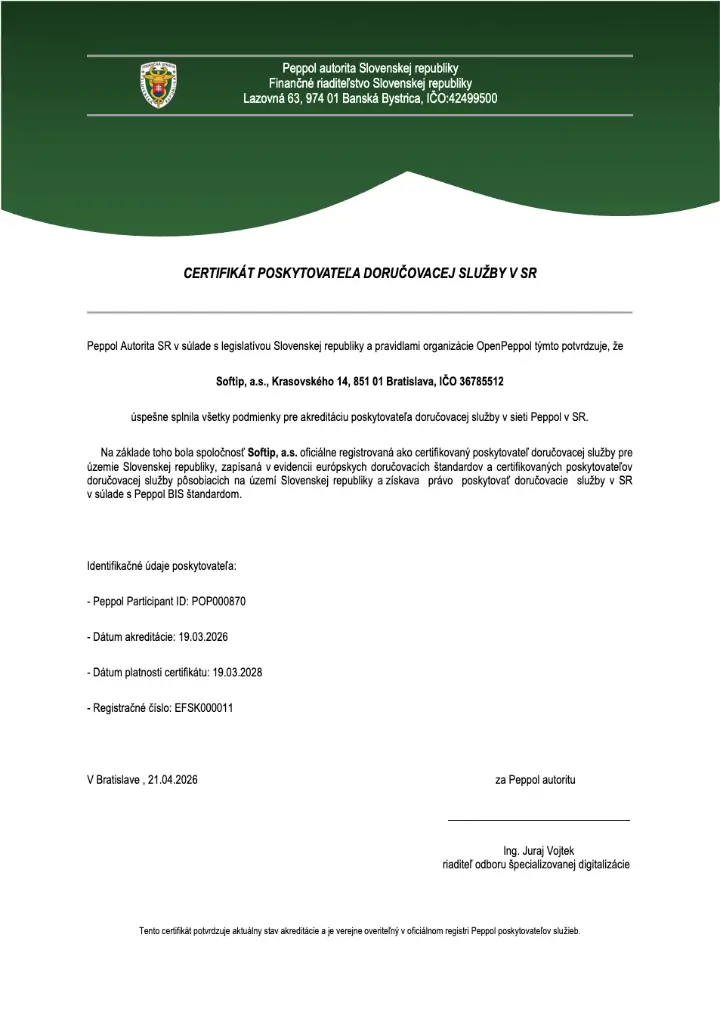
Yes. SOFTIP, a. s. is an accredited provider of delivery services within the Peppol network for the territory of the Slovak Republic.
• Peppol Participant ID: POP000870
• Registration number: EFSK000011
• Date of accreditation: 19 March 2026; the certificate is valid until 19 March 2028
• The certificate was issued by the Slovak Republic’s Peppol authority – the Financial Directorate of the Slovak Republic
Why choose SOFTIP Digital Postman?
Because it brings together everything a customer needs in one place: certified access to Peppol, a web interface, a REST API, document validation, status overviews, statistics, multiple levels of support and transparent pricing based on actual volume. The solution is built on SOFTIP’s more than three decades of experience with enterprise systems and on the company’s security and process standards.
Is this solution also suitable for a small business or a sole trader?
Yes. If you do not require full integration with an ERP system, you can manage e-invoices via the web interface. The lowest price tier is designed for 0 to 10 documents per month, so the service is also available to users with a low volume of invoices.
Is this solution also suitable for a large organisation?
Yes. Larger organisations can make use of the REST API, controlled access, automated document upload and download, status tracking and bespoke pricing for volumes exceeding 50,000 documents per month.
Which bank details should I use when paying invoices for the SOFTIP Digital Postman service?
SOFTIP, a.s. has set up a separate bank account intended exclusively for payments relating to the service SOFTIP Digital Post-Processor.
Account name: SOFTIP, a. s.
IBAN: SK03 1100 0000 0029 4930 2813
BIC/SWIFT: TATRSKBX
Bank: Tatrabanka, a.s.
You can also check your bank account number at the Slovak Financial Administration’s website.
The opening of a new bank account applies exclusively to the SOFTIP Digital Postman service. For payments for other services provided by SOFTIP, a.s., the original bank details stated on the invoices remain valid.
Responsibilities
Since when has electronic invoicing been compulsory?
The key date for mandatory domestic electronic invoicing is 1 January 2027. The year 2026 is a preparatory and voluntary period during which businesses can choose a digital mail provider, adapt their processes and test the integration.
Who will be required to issue and send e-invoices from 1 January 2027?
For domestic transactions, the obligation to issue an e-invoice applies primarily to domestic VAT payers in accordance with the provisions of the VAT Act. The type of supply and the status of the recipient are also decisive factors; in specific cases, we recommend checking the particular situation against the current guidance issued by the Financial Administration.
Who will be required to accept e-invoices?
From 1 January 2027, every legal entity and every taxable person – including many non-VAT payers – must be able to accept e-invoices. These include, for example, companies, sole traders, members of the liberal professions, self-employed farmers and landlords.
I am not registered for VAT. Do I need a digital postman?
If you are a legal entity or a taxable person, you must be able to receive e-invoices even if you are not a VAT payer. You are not obliged to issue e-invoices solely on the basis of this status, but you may use them on a voluntary basis.
Does this obligation apply to ordinary citizens or consumers?
No. If you are an ordinary member of the public and do not run a business, mandatory electronic invoicing does not apply to you. You will continue to receive invoices for standard consumer services as before.
Do I have to stop sending PDFs by email once e-invoicing has been introduced?
For a transaction subject to the mandatory regime, the decisive document is a structured e-invoice sent via a delivery service. A PDF file sent by email alone does not fulfil this obligation. However, the PDF may be included as an accompanying readable version or as an attachment.
Are there any exemptions from the e-invoicing requirement?
Yes. The obligation does not apply, for example, to certain supplies exempt from tax under the VAT Act, or to cases where the taxable person issues a simplified invoice in accordance with Section 74(3)(a) or (b). As the exemptions depend on the specific transaction, we recommend assessing them in accordance with the current wording of the Act and the Financial Administration’s guidelines.
Do I need to have a digital postbox even if I’m only receiving invoices?
Yes, if you are one of the parties required to receive e-invoices. SOFTIP Digital Postman provides you with an electronic inbox and an overview of received documents, even without full integration with your ERP system.
What should I do to make sure I’m prepared?
Choose a certified provider, register your organisation, confirm your provider via the Financial Administration interface, and decide whether to use the web interface or integration with your accounting system. At the same time, set up internal processes for the approval, accounting and statutory archiving of XML invoices.
Price list and registration
How much does SOFTIP Digital Postman cost?
The price is based on the actual number of documents sent and received in a calendar month. For volumes of up to 1,000 documents, a monthly flat rate applies; for 1,001 documents or more, a per-document rate applies. Basic support is included in the price. A full overview of the pricing tiers can be found in price list.
Why is the price list fair?
You don’t pay for a fixed package that you may not use. The billing tier is determined each month based on the actual number of documents sent and received, and may be adjusted upwards or downwards. The price therefore naturally adapts to your business needs.
Do I have to choose a fixed package in advance?
No. When you register, you provide a realistic estimate of your expected monthly usage so that a baseline tier can be set and the service activated. The monthly charge is then calculated automatically based on your actual usage.
Why do I need to state the actual number of documents when registering?
The estimated volume determines the initial tier and the one-off set-up fee; it should therefore reflect the actual expected usage. It is neither a minimum usage requirement nor a fixed monthly limit. Once the service has been activated, monthly billing is automatically based on the actual number of documents sent and received.
Can I declare the lowest income bracket simply to pay a lower registration fee?
No. When registering, please provide a realistic estimate of the number of documents. The initial range is used to set up the service and calculate the set-up fee correctly; the system will automatically take into account any monthly fluctuations after activation, based on actual usage.
What happens if I exceed my baseline range during the month?
You do not need to amend the contract or sign an addendum. The tier corresponding to the actual number of documents will automatically apply for that month. If the volume is lower in the following month, a lower tier may automatically apply.
Are both sent and received documents counted?
Yes. Both sent and received documents are included in the actual monthly volume.
Is the set-up fee payable every month?
No. This is a one-off fee for setting up the service. The amount depends on the actual starting tier selected at the time of registration.
Do the prices include VAT?
No. The price list shows prices excluding VAT. VAT will be added to the price at the rate applicable at the time of invoicing.
What is included in the basic price of the service?
This includes the use of the SOFTIP Digital Postman service within the relevant band, basic support, 99.5% service availability (%), a web interface, an overview of sent and received documents, and the features specified in the contract, the General Terms and Conditions and the current price list.
What levels of support can I choose from?
The Basic, Standard and Premium tiers are available. Support is provided on working days from 8.00 to 16.00 via the SOFTIP Helpdesk. Service availability across all tiers is 99.5 %; the main difference lies in the guaranteed response and recovery times in the event of a critical incident.
What is a critical incident?
This refers to a situation where essential parts of the application are unusable for activities required by law, the customer is unable to proceed by alternative means, and the problem affects their entire organisation. The response time begins to run once the incident has been duly logged with the Helpdesk during support hours.
How does the registration process work?
You will begin the registration process via the Financial Administration interface, where you will select SOFTIP as your delivery service provider. You will then be sent a link to register online for the SOFTIP Digital Postman service. During registration, you will complete and verify your organisation’s details, specify the actual estimated number of documents, select your support level, and electronically confirm the contract, the General Terms and Conditions, and the price list. Once registration is complete and the service has been activated, you can start using it. You can find the full procedure on the website How it works.
How do I select SOFTIP as a provider on the FS SR portal?
On the FS SR portal, open the application for selecting a certified delivery service provider. The process consists of six steps:
- Log in using the same account you use for the Personal Online Portal (via slovensko.sk or with your username and password). The first time you log in, confirm the app’s access to your data.
- In the list of providers, find SOFTIP, a. s. and click ‘Select’, then ‘Continue’.
- Select the tax entity on whose behalf you are acting. It must have been issued with and have registered a tax identification number.
- Please enter your email address and telephone number in international format (+421 …).
- Click ‘Allow’ to consent to the transfer of the data subject’s data to SOFTIP.
- Check the summary and submit. You will receive a confirmation in the message inbox in your Personal Online Zone.
We will then send you a link to register for the SOFTIP Digital Postman service. Detailed instructions with images can be found in the official FS SR handbook (PDF).
The portal reports that the entity does not have a registered and notified VAT number. What does this mean?
On the FS SR portal, the system only allows you to select a provider if the entity has been assigned and registered a VAT number. If you select an entity without one, the portal will display an error message and you will not be able to continue with the process. Please check that you have selected the correct entity. If the company does not yet have a VAT number, apply for registration at the tax office and repeat the selection once it has been issued.
How do I log in to the provider selection app?
The account you use to log in to the Personal Online Zone on the FS SR portal is used. You can log in via the slovensko.sk portal (using a chip ID card, a chip residence permit, the Slovensko v mobile app or an EU digital identity) or with a username and password. If you do not have an account on the portal, please register on the FS SR portal first.
What happens after I submit my selection on the FS SR portal?
You will receive a message in your message inbox in the Personal Online Zone confirming that your application has been submitted. The portal will also send SOFTIP an email and an electronic notification containing your company’s contact details. We will then contact you with a link to complete your registration. If you do not hear from anyone, the portal will notify you of the failed delivery via a message in your inbox, and you will need to repeat the process.
The portal has alerted me to a duplicate selection. What should I do about it?
A warning will appear if you have previously submitted an application to SOFTIP for the same organisation. If you have already successfully completed the selection process, you do not need to repeat it. If you have not received confirmation of your registration with us, you may proceed and submit the application again.
What do I need to start the registration process?
Please have your organisation’s VAT number, contact details, a realistic estimate of the total number of documents sent and received each month, and the required level of support to hand. The organisation’s details must be checked before confirmation.
By when do I need to confirm SOFTIP on the FS SR portal?
SOFTIP must be confirmed as the service provider no later than 60 days after the contract is concluded. The service may commence only once the activation conditions have been met.
For how long is the contract valid?
The contract is concluded for an indefinite period. The terms and conditions governing changes to or termination of the service are set out in the contract and the current General Terms and Conditions.
Technical questions
How does the sending of e-invoices work?
The invoice, in XML format in accordance with Peppol BIS Billing 3.0, is submitted to the SOFTIP Digital Postman. The Digital Postman performs validation checks, retrieves the recipient’s delivery details and sends the document via the Peppol network to the recipient’s provider. You can track the status of the document via the web interface or via the API.
How does the e-invoice acceptance process work?
The received document is displayed in the web interface and can be made available to a connected information system via an API. Both the original XML and a human-readable representation generated from the XML are available.
Can I also create an invoice in SOFTIP Digital Postman?
Yes. The web interface includes a tool for creating invoices and converting them into the required Peppol BIS 3 XML format. This is particularly useful for users whose accounting system does not yet generate e-invoices.
Does SOFTIP Digital Postman convert any document from an ERP system into XML?
In the web interface, you can use the tool to create and convert invoices. However, with direct API integration, the client system must submit a valid XML file in accordance with UBL 2.1 and Peppol BIS Billing 3.0; the public API is not intended for converting arbitrary input formats.
What types of invoicing documents are exchanged via Peppol?
The basis consists of invoices, correction documents, credit notes and self-invoices in accordance with the supported Peppol BIS profile. The specific type is identified in the XML by the document code and must correspond to its actual business meaning.
What do codes 380, 383, 384 and 386 mean?
- 380 – Commercial invoice: a standard commercial invoice.
- 383 – Debit note: a debit note or debit voucher.
- 384 – Corrected invoice: a corrected invoice that amends the details of a previous invoice.
- 386 – Prepayment invoice: an invoice for payment in advance, depending on the meaning of the code; a pro forma invoice that does not contain the required details of a tax invoice is not, in itself, an e-invoice.
These types can be created in the SOFTIP Digital Postman web interface. Always issue a correction in accordance with the actual legal and accounting nature of the document.
What is the code for a credit note?
A standard credit note in UBL CreditNote uses code 381 – Credit note. Peppol distinguishes between a separate CreditNote XML structure and a separate credit document code list.
Can I add attachments to an e-invoice?
Yes. SOFTIP Digital Postman supports attachments, such as PDFs, image files and others. The maximum size of the entire invoice, including all attachments, is 10 MB.
Can a QR code or a payment link be attached?
Yes. A QR code may be a separate image attachment or part of a PDF attachment. However, the e-invoice itself must remain a valid structured XML document.
What statuses for sent invoices will I see?
The document passes through statuses such as NEW, VALIDATED, PREPARING, READY and SENDING. The final successful status is DELIVERED. INVALID indicates unsuccessful validation, TEMPORARY_FAILURE indicates a temporary problem, and FAILED indicates a definitive delivery failure following the exhaustion of attempts or a negative confirmation.
What statuses does a received invoice have?
A received document may have the status NEW, READ, DOWNLOADED or ACKNOWLEDGED. These statuses help to distinguish whether a document has merely been received, viewed, downloaded or whether its receipt has been confirmed by a downstream system.
Does the mail client display statistics?
Yes. The dashboard provides a monthly overview of the number of invoices sent and received and displays their statuses. This allows the customer to see both the volume of processing and any documents requiring attention.
What is SMP?
SMP (Service Metadata Publisher) is a directory component that publishes information on where a Peppol participant is registered, what types of documents it can receive, and to which technical address they should be delivered. For each Participant ID, incoming messages are routed to the provider specified in the SMP.
What is SML?
SML (Service Metadata Locator) is Peppol’s search layer. It helps the sender find the correct SMP for a specific Peppol ID. Put simply: SML indicates which directory to search in, and the SMP provides the specific delivery details.
What is AS4?
AS4 is a secure technical protocol used by Peppol Access Points to exchange messages. It defines a standardised method for transmission, security and delivery confirmation between providers.
Integration
Can SOFTIP Digital Postman be integrated with our ERP system?
Yes. The solution is ready for integration with SOFTIP systems as well as with other ERP or accounting solutions. The public REST API covers document validation and submission, retrieval of received invoices, status tracking, downloading of attachments and other integration operations.
Do I have to use SOFTIP’s ERP system?
No. You can use SOFTIP Digital Postman via a web interface or integrate it with another information system via an API.
How does the app authenticate itself with the API?
An API key in the X-API-KEY header or a JWT Bearer token is supported. Access to the organisation’s data is linked to the user account and its permissions.
Can a single account be used with more than one organisation?
Yes. Depending on the permissions assigned, a single account may have access to one or more organisations. The API provides a list of organisations available to the logged-in user.
How does the API send a document securely and without duplicates?
A unique Idempotency-Key is used when submitting a request. Repeated submissions using the same key are rejected, which helps to prevent unwanted duplicates. The API also returns a transaction identifier, the status and the checksum of the received file.
Can we validate the XML before sending it?
Yes. The validation endpoint checks file rules, XML schemas and Schematron business rules without creating a submission transaction. It is suitable for developing and testing integrations.
How does our system retrieve incoming invoices?
The API supports several strategies: retrieving undownloaded documents, retrieving documents by status, or retrieving them from a specific date and time. Documents can be paginated, downloaded as the original XML, and their receipt subsequently confirmed.
Do you support both polling and webhooks?
Yes, the integration can use polling to retrieve documents and statuses at regular intervals. The current public API also includes webhook registration and an event schema for selected failure statuses, in particular FAILED and REJECTED. We recommend checking the specific scope of events against the latest Swagger documentation during implementation.
Can we also download a legible version of the invoice and any attachments via the API?
Yes. The API allows you to download the original document, the PDF or HTML version, and individual attachments using the transaction ID and the attachment serial number.
What do the corners C1 to C5 mean?
- C1: the supplier’s or invoicer’s system.
- C2: the sender’s delivery service provider.
- C3: the recipient’s delivery service provider.
- C4: the invoice recipient’s system.
- C5: the Financial Administration’s module for statutory electronic data reporting.
In the case of self-invoicing, the document may flow in the opposite direction, but the corner codes remain linked to the supplier’s and customer’s business roles.
Where can developers find the latest API documentation?
The current Swagger test version is available at publicapi.test.softipdigitalnypostar.sk/swagger. It contains endpoints, data models and a description of the authentication process; for production deployment, use the parameters and addresses assigned by SOFTIP.
Safety
Is SOFTIP Digital Postman a certified solution?
Yes. SOFTIP operates as a certified Peppol Access Point Provider, and according to internal documentation, product certification for the SOFTIP Digital Postman solution was completed in October 2025. The solution implements Peppol’s requirements for addressing, transmission, security and statistical reporting.
How does SOFTIP manage information security?
SOFTIP has an integrated management system which includes, amongst other things, ISO/IEC 27001 for information security, ISO/IEC 27018 for the protection of personal data in the cloud, ISO 22301 for business continuity and ISO/IEC 20000-1 for IT service management. The system is regularly reviewed through certification and surveillance audits.
Who audits SOFTIP’s certifications?
The certification of the integrated management system was carried out by auditors from the certification body CERTICOM. SOFTIP publishes the certificates on its website in the ‘Management Systems’ section.
Where is the service operated?
SOFTIP Digital Postman is operated on the Amazon Web Services cloud. In accordance with the Terms and Conditions, content may be stored on remote storage facilities in the Slovak Republic, other EU Member States and countries within the European Economic Area.
How is access to data and the API protected?
Access is controlled by user accounts and permissions. The integration interface supports authentication via an API key or a JWT Bearer token, and authorisation restricts access to the organisations and operations assigned to a specific account.
How long does SOFTIP store content within the app?
Documents and transactions relating to documents are retained in the application for six months. This is for operational retention purposes relating to the service; it does not fulfil the customer’s statutory archiving obligation.
Is SOFTIP Digital Postman a legally compliant invoice archive?
No. The user is obliged to store invoices and output documents using their own resources as well. From 1 January 2027, under the current methodology, the payer must retain electronic invoices in their original XML format for ten years from the end of the calendar year to which they relate.
Why is SOFTIP a trusted partner for e-invoicing?
SOFTIP combines a certified Peppol solution, expertise in enterprise systems, over 14,000 customers, integrated security and process standards, a local helpdesk and the option to choose guaranteed response times. Instead of an isolated mailbox, you’ll gain a partner who understands invoicing, ERP and integrations.
Legislation
What is the deadline for issuing and sending an e-invoice?
The standard statutory period remains 15 days from the delivery of the goods or services, unless otherwise specified by law. According to a statement by the Financial Administration of the Slovak Republic, an e-invoice is only deemed to have been issued once it has been sent; therefore, the date of issue should be the same as the date of dispatch.
What about sending invoices in bulk just before midnight?
Internal processes must be set up so that dispatch is completed on the date specified as the issue date. Simply receiving the batch for processing before midnight is not sufficient if the invoice is not dispatched until the following day.
Is it the customer or SOFTIP Digital Postman who reports the data to the Financial Administration?
In the standard process, the reporting of selected data is carried out automatically by a certified delivery service provider. The customer therefore does not need to manually transcribe each invoice onto a separate form.
What penalties apply for failure to comply with the reporting obligation?
According to the Financial Administration’s FAQs, the fine for failure to report, incorrect reporting or late reporting can be up to €10,000, and up to €100,000 in the event of a repeat offence. The law and the methodology also address cases of obvious error and proven failure on the part of the provider; each specific case must be assessed on its own merits.
How long do I need to keep e-invoices on file?
From 1 January 2027, taxpayers must retain electronic invoices for ten years from the end of the calendar year to which they relate. According to the Financial Administration’s guidelines, they must be retained in their original XML format.
Do I also need to file the delivery confirmation?
A confirmation of dispatch or delivery does not replace the archiving of the invoice itself. The provider retains operational logs of receipt and delivery for at least six months; however, the customer must fulfil their own legal obligation to archive the invoice.
Does an e-invoice require a qualified electronic signature?
In the case of invoices delivered via a certified delivery service, this is not a general requirement for the transmission via Peppol itself. The law recognises an electronic signature or seal as one of the methods of ensuring the authenticity of origin and the integrity of the content in other forms of electronic invoicing.
Can I send e-invoices abroad?
Peppol is an international network which, from a technical perspective, facilitates cross-border exchanges with participating organisations. However, the Slovak mandatory regime, which comes into force on 1 January 2027, will initially apply only to domestic transactions; according to the current timetable, the extension of the mandatory regime to cross-border transactions will take effect on 1 July 2030.
What happens if the recipient uses a different digital mailbox provider?
That’s fine. Peppol is an interoperable network: both the sender and the recipient can use different certified providers. Routing is carried out based on the Peppol ID and the data published in the SMP.
Can I use more than one provider?
For incoming transactions, only one provider may be specified for a given Participant ID in the SMP. For outgoing transactions, an entity may have contracts with several providers; the specific choice depends on the system configuration and contractual arrangements.
How does the switch to digital post work?
The entity contacts the new provider, who will handle the changeover process. Technical migration in Peppol/SMP uses a migration code: the original provider sets this up and passes it on to the new provider; following successful registration, the link is updated. According to a direct statement from the Financial Administration of the Slovak Republic, there are no plans for an automatic webhook notification to the original provider. Upon termination of the contract, the original provider is obliged to ensure that the entity is deregistered from the central SMP within three working days at the latest.
What happens when the contract with SOFTIP ends?
Once the active provision of the service has ended, the account will remain accessible for a further two months, although active features will no longer be available. The customer must download their data and outputs by the end of this period at the latest; once this period has expired, the account and its contents will be permanently deleted.